Can CheckpointGuard show security guards on a live GPS map?
Yes. CheckpointGuard includes a live GPS guard map so supervisors can see active guards and recent location updates during a shift.
 CheckpointGuard
Locate active security guards, review patrol routes and investigate gaps in coverage. See current positions and historical movement with the guard and site context needed for follow-up.
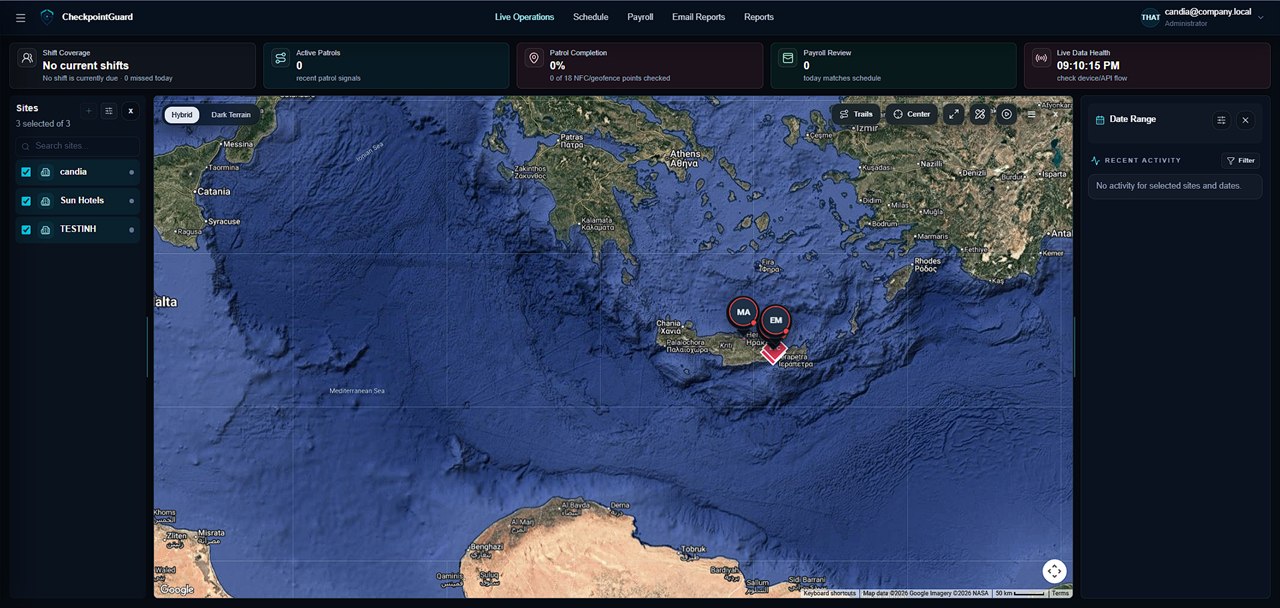
Select the client site in Live Operations to review active guards and their recent GPS updates. Check the update time before treating a marker as current. Phone permissions, signal and network availability affect when the dashboard receives a position.
See how a supervisor reviews a recorded patrol in this 55-second CheckpointGuard walkthrough. Select a guard, start playback and adjust the speed to review the route alongside checkpoint scans and geofence events.
Playback shows the location and events actually recorded. Gaps in GPS samples are not proof of the movements between them.
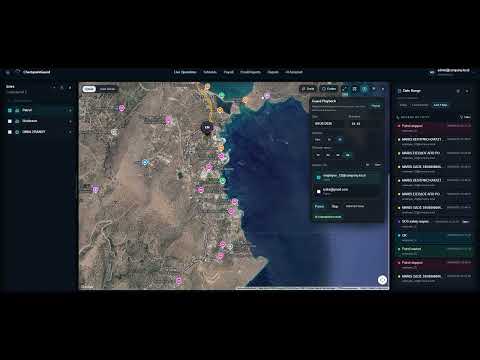 Watch GPS playback — 55 seconds
GPS provides location context during enabled active-work workflows. An NFC tap or QR scan records a deliberate checkpoint action. Use both where the contract requires named visits, and use geofences when you need evidence for a broader patrol area.
Start with the guard, assigned site and the period the supervisor needs to explain. Check the latest position's timestamp before using it to discuss current coverage. For an earlier event, open the recorded trail for that period and compare the available samples with the relevant QR or NFC visit and any message or alert.
Illustrative example: a client asks about a service entrance at 02:10. Review the entrance's checkpoint record and the surrounding trail, rather than using the guard's present map position to answer a historical question. A nearby GPS sample provides context; it does not establish that the guard touched an NFC tag, scanned a QR label or inspected the entrance. If the necessary evidence is absent, keep that uncertainty in the follow-up.
An Android phone can queue captured GPS samples during an active patrol and upload them after reconnection. Those samples belong to the earlier route; they do not become a fresh live position. Reconnection cannot recover a location the phone never recorded.
When testing a route, check location permissions, active-work status and connectivity. Buildings and weak reception can leave gaps. Use QR or NFC for a deliberate check at a named point, and GPS or an outdoor geofence for location context.
Yes. CheckpointGuard includes a live GPS guard map so supervisors can see active guards and recent location updates during a shift.
Yes. Supervisors can select a date and timeframe to replay the recorded guard trail and compare movement with patrol events.
No. GPS gives location context, while NFC checkpoint scans provide stronger proof that a specific checkpoint was visited. CheckpointGuard can use both together.
Yes. Guard location, trail history, NFC scans, geofence events, SOS alerts, and reports are connected inside the operations dashboard.
Yes. Hotels and resorts can use CheckpointGuard to monitor security coverage, review patrol movement, confirm checkpoint visits, and generate clearer security reports.
Yes. Aegis can help admins understand guard activity using allowed CheckpointGuard data, including recent location updates, shift context, SOS alerts, and patrol status.
GPS is used during the enabled active-work workflows and depends on the guard device permissions and available signal.