What can appear in a CheckpointGuard report?
Reports can include guard activity, patrol events, NFC checkpoint scans, geofence visits, SOS alerts, guard messages, supervisor notes, and operational history.
 CheckpointGuard
Turn recorded patrol activity into a daily security report. Select the site and period, preview the report, and configure automatic email delivery to the people who need it.
This sample was generated by the actual automatic email-report tool using demonstration records: patrol start and stop, a QR scan, an NFC scan and a geofence visit. It shows the real report layout with invented site and guard details. No customer data is included.
Choose the reporting scope and period, then include the relevant checkpoint visits, geofence activity, SOS alerts and messages. Review exceptions before sharing the report so the client can distinguish completed checks from events that need an explanation.
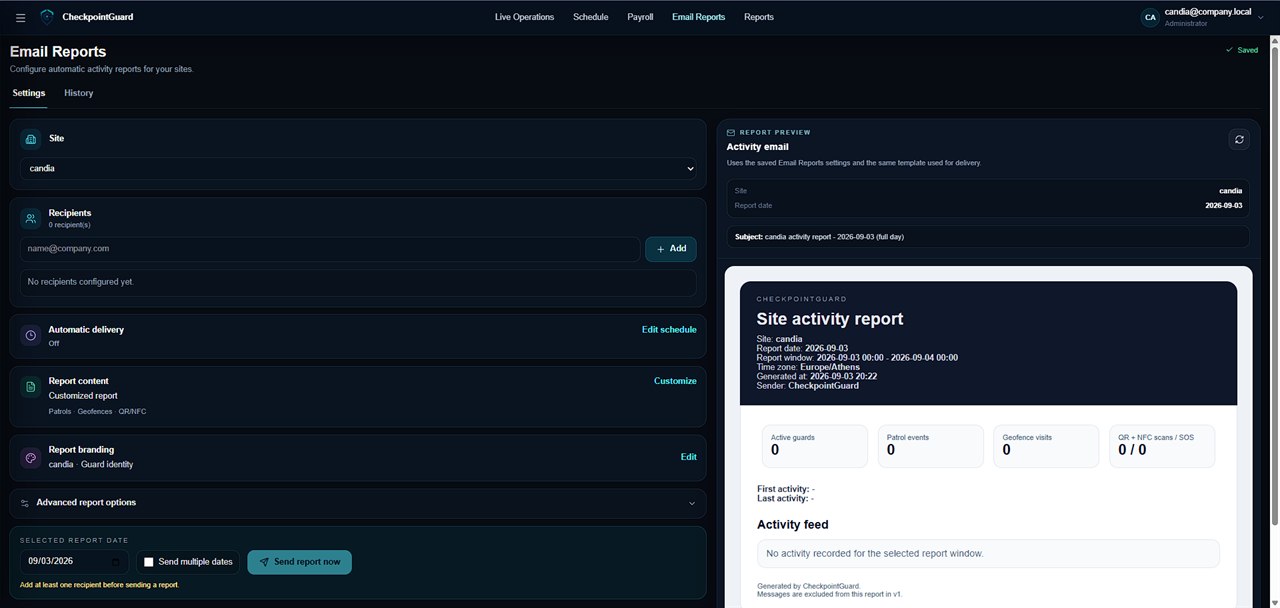
The screenshots below show the report scheduler and the client email layout using representative data. Preview your own report to check the content and branding before sending it. A useful report identifies the site, time period and recorded activity without relying on unexplained screenshots.
Configure recipients, delivery times and the report sections needed for the contract. Use recurring delivery for routine updates and an on-demand report for a specific question. Check the recipient list when a site's contact or contract changes.
When a client queries a missed visit, open the underlying checkpoint and patrol history for that period. The report is a view of recorded activity, so keeping the event time and site context accessible makes a follow-up more precise.
Select the client site and report date, and check the configured reporting time zone before reviewing an overnight period. Inspect the preview's site, period and included records, then confirm the intended recipients and delivery settings. When a contact changes, review the recipient list instead of assuming the previous distribution remains appropriate.
After a scheduled or manual send, inspect the available delivery history and status. A scheduled report is not by itself evidence that a recipient read it. If delivery fails, investigate the reported failure and configuration before relying on the next scheduled email. Keep this delivery check separate from reviewing whether the patrol evidence is complete.
Illustrative report review: the selected period contains a patrol start, a named NFC visit and a later SOS record, but no received visit for another expected point. Confirm the guard, site and event times in the underlying records before adding context for the client. A scan records a checkpoint interaction; it does not describe everything the guard inspected. An SOS record identifies an alert, not a verified outcome of the response.
Use the existing demonstration PDF to discuss layout and the types of recorded events with the client. Agree which operational questions the report should answer, then preview the site's own records. Do not copy the sample's invented names or events into a live client account.
Reports can include guard activity, patrol events, NFC checkpoint scans, geofence visits, SOS alerts, guard messages, supervisor notes, and operational history.
Yes. Configure recurring email delivery for routine client updates, or generate and send a report manually when a client or manager needs it. Preview the content, site scope and recipients before sending.
Yes. Hotels and resorts can use CheckpointGuard reports to review night security activity, patrol coverage, SOS alerts, site incidents, messages, notes, and management-ready summaries.
Yes. Reports can include NFC checkpoint scan activity so supervisors and clients can review verified patrol events.
Yes. Reports can include geofence visit activity where geofence monitoring is used as part of the security workflow.
No. Live Operations helps supervisors manage the current shift. Reports explain completed work to managers and clients.