Security guard management software for the whole shift.
Manage guards, patrol checkpoints, schedules and client reports in one security operations platform. Start with a single site and add the workflows your team needs.
Book a demo Try for free
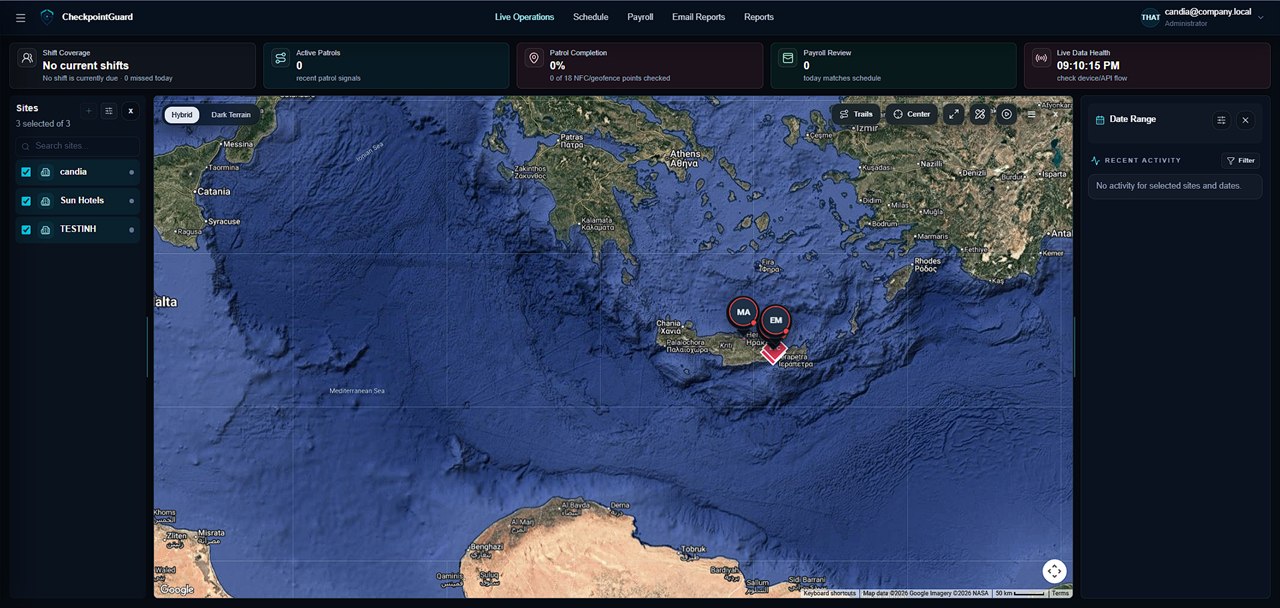
Run the control room from one view
Open Live Operations to review active guards, assigned sites, recent location updates and SOS alerts. Select the site that needs attention, then check the guard's activity before calling the supervisor. Location history helps explain what happened earlier in the shift.
Explore GPS guard tracking
Connect the roster to the patrol record
Create the weekly guard schedule and compare expected coverage with recorded attendance. QR and NFC visits provide checkpoint evidence, while approved time feeds guard-pay and labour-cost review. Managers can investigate a missing visit and a time discrepancy against the same site and shift.
Evaluate a QR-Patrol alternative
Give each client a useful report
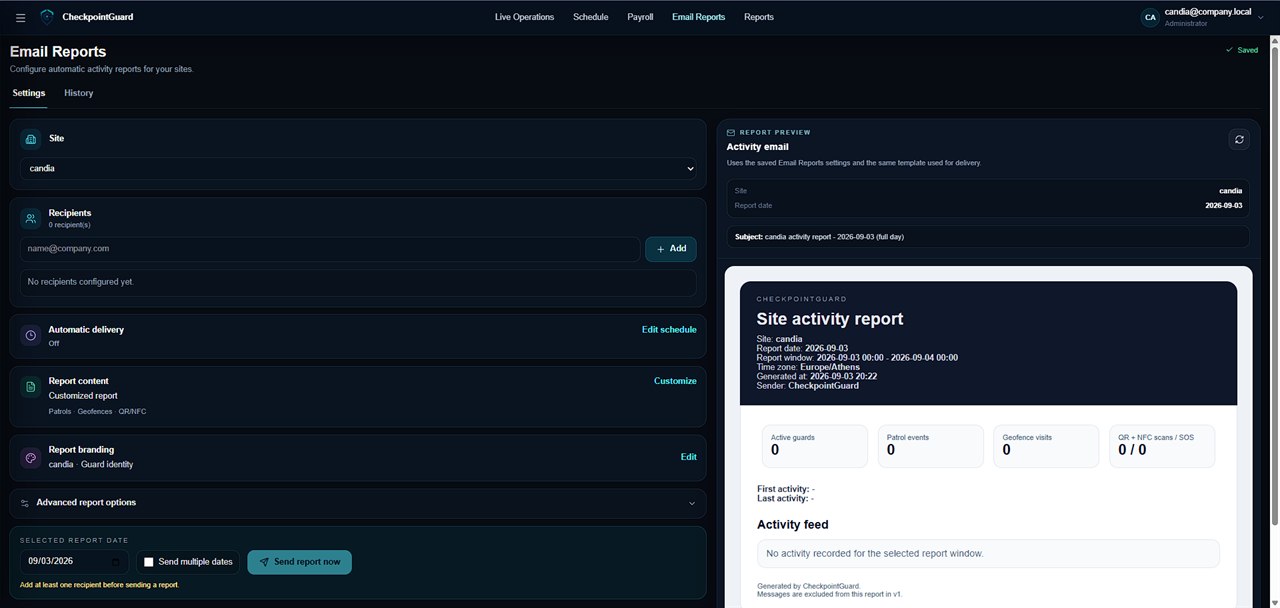
Choose a reporting period, include the relevant patrol and alert records, and preview the client report. Configure scheduled email delivery for recurring updates. The reporting page shows the actual scheduler and an example of the report layout.
Choose the access each team needs
Assign administrators to the sites they supervise and guards to their field work. Compare Pro for patrol proof, Gold for live supervision and workforce tools, and Platinum for Aegis where enabled. The pricing page lists the total charge for each guard range.
Compare total prices, guard limits and included features
Customer example: daily patrol reports
G&G Security Group uses live guard monitoring and automatic daily reports alongside scheduling, guard-level cost and site revenue review. Its supplied implementation story explains how those workflows replaced separate patrol and workforce checks.
Read G&G Security Group's implementation story
Walk through a shift review
Start with one client site and an agreed reporting period. This sequence demonstrates how a supervisor can turn the shift record into a useful client update.
- Create the site, assign its guard and give the supervisor access to that site.
- Record a test patrol with named QR or NFC checkpoints, then confirm the event times in Live Operations.
- Compare the planned shift with recorded attendance. Investigate gaps before approving payable time.
- Preview the report, check its recipient and site scope, then configure recurring delivery when the content is ready.
See the report preview and email scheduler
What a useful client update explains
A report should help the reader distinguish recorded work from exceptions that still need follow-up. The following is an illustrative review checklist, not a report exported from a customer account.
Example: review of a single overnight shift| Review item | Evidence to check | Client context |
|---|
| Coverage | Assigned shift and attendance times | Which period and site the update covers |
| Patrol visits | Named checkpoint, guard and event time | Which checks were recorded |
| Exception | Missing visit, alert or delayed upload | What the supervisor investigated |
| Follow-up | Relevant message or reviewed event | What remains unresolved |
Download the automatic email report sample (PDF)
What you need before the first live shift
Prepare an administrator account, the site names, guard logins and an Android patrol phone. Assign the guard to the intended site and test one visit before rolling out the rest. Live map updates need location permission and a working connection; a phone without connectivity cannot provide immediate remote confirmation.
Check the Android patrol app and field workflow
Example: review an exception before closing the shift
Illustrative workflow: the roster shows overnight coverage, a checkpoint visit is missing from the selected period and the guard's latest map update is old. First confirm the site, guard and period being viewed. Check messages and received patrol events, and contact the responsible supervisor to establish whether the issue concerns the visit, the phone connection or the assignment. Record only what the available evidence supports in the client update. Review attendance separately before using hours in cost preparation; neither the missing scan nor the old map marker establishes how long the guard worked.
Compare CheckpointGuard and TrackTik for your operation
Automatic Email Reports
Configure recipients, delivery schedules, report content and branding, then preview the exact client report before it is sent.
FAQ
What should security guard management software include?
For most security teams it should include guard profiles, site assignments, live guard visibility, patrol proof, incident or SOS handling, schedules, reports, and a way to review hours for payroll. CheckpointGuard combines those workflows instead of treating guard tours as a separate island.
Can CheckpointGuard be used by security companies with multiple clients?
Yes. The product is designed around admins, sites, guards, scoped operational data, reports, and client-ready records. Normal admins only see their own allowed data, while super-admin behavior follows the existing permission rules.
Does CheckpointGuard replace paper patrol logs?
It can replace much of the paper and spreadsheet work by recording patrol activity digitally through GPS context, QR and NFC checkpoints, geofences, SOS alerts, and report data. Teams can still keep their own procedures, but the operational proof is easier to review.
Related CheckpointGuard solutions
 CheckpointGuard