A security guard checkpoint system for QR, NFC and GPS patrols.
Record patrol visits, review missed checkpoints and share the evidence with clients. CheckpointGuard combines a guard tour system with an Android patrol app and a supervisor dashboard.
Book a demo Try for free
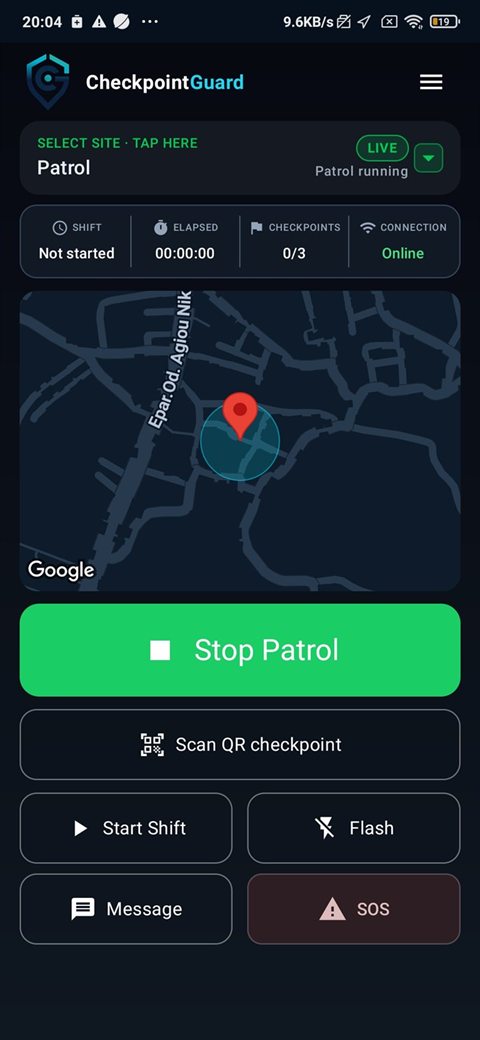
The guard's Android workflow: start the patrol, select the assigned site and scan a QR checkpoint. Screenshot from the product; this is not a record of a completed customer patrol.
Set up named checkpoints
Add the client site, name the areas to be checked and choose a checkpoint method. A printed QR label suits a camera scan, an NFC tag requires a nearby tap, and a geofence covers an outdoor area. Test each point with a guard before using the route.
Compare CheckpointGuard with QR-Patrol
Record the visit during patrol
The guard starts the assigned patrol and scans the checkpoint in the Android app. The record connects the visit with the guard, site and timestamp. Where supported, offline visits are retained for upload after the phone reconnects; they cannot provide immediate remote confirmation.
Follow the Android guard app workflow
Investigate missed or overdue checks
Where a checkpoint interval or schedule applies, review completed visits alongside overdue or missing evidence. Check the event time and related location history before deciding whether to contact the guard or adjust the patrol requirement.
Review patrol route history
Use checkpoint evidence in client reports
Review a named site's patrol records for the reporting period, then include the visits and relevant exceptions in a client report. A checkpoint record confirms a recorded action; it does not replace a supervisor's review of what the guard found.
See how patrol evidence feeds client reporting
Demonstrate a three-point patrol
Use this small example to check the workflow before adding a full site. Choose actual checkpoint locations that suit your operation.
- Name three points: main entrance, service door and car park. Use QR or NFC at the doors and a suitable method for the outdoor point.
- Assign a guard and scan each physical checkpoint during a test patrol. Confirm the names and event times in the supervisor view.
- Where offline capture is supported, test a brief connection loss in a controlled trial and confirm the queued visit after reconnection.
- Review the reporting period and make sure delayed uploads are interpreted using their original event times.
Follow the first-site setup guide
Read checkpoint evidence correctly
These invented records illustrate the questions a supervisor should ask. They are not a customer log or a promise that every event type has identical fields.
Illustrative patrol evidence — example times only| Event | Recorded context | How to read it |
|---|
| 22:04 · Main entrance | QR visit recorded for the assigned guard | A scan was recorded; review verification context if disputed. |
| 22:12 · Service door | NFC visit uploaded at 22:25 | The event happened at 22:12; the upload arrived later. |
| Car park · no visit shown | No matching evidence in the selected period | Investigate assignment, device and connectivity before concluding the patrol was missed. |
Download the automatic email report sample (PDF)
Choose checkpoints for the actual site conditions
QR needs a readable label and camera access. NFC needs compatible tags and an NFC-capable Android phone. Geofences depend on location accuracy and suit outdoor areas better than an exact indoor doorway. Test the route with the phone, lighting and coverage your guards will use.
What each checkpoint method establishes| Method | Required equipment | Limitation to test |
|---|
| QR | Printed label and Android camera | Lighting, label damage and scan position |
| NFC | Registered tag and NFC-capable phone | Tag placement and the phone's reader position |
| Geofence | Android location services | GPS accuracy, background access and network delay |
Understand GPS geofences and their limits
Checkpoint software and hardware costs
For 1-3 guards, Pro includes QR and NFC patrol tools at EUR 34.17 per month when billed annually (EUR 410.00 per year), or EUR 40.00 billed monthly. Live GPS and geofences require Gold or Platinum. Prices exclude VAT; physical NFC tags are separate.
See all guard ranges, plans and NFC tag prices
Review an offline patrol after reconnection
Supported QR visits and captured GPS samples can be retained on the Android phone for later upload when connectivity is interrupted. Supervisors cannot use those unsent records for immediate remote confirmation. After reconnection, review the received event time and site context rather than treating upload time as a new visit. Timestamp validation can affect how a questionable device time is represented, so investigate inconsistent times before relying on them.
A queued record and an unrecorded check are different: reconnection does not create a missing scan or location sample. Test a short connection interruption during a controlled trial, restore connectivity and confirm the received records before depending on that workflow at a poorly connected site.
Download a patrol checklist for recording task results
FAQ
Is CheckpointGuard a guard tour system?
Yes. It includes checkpoint proof, guard activity, location context, missed or overdue checkpoint review and reporting. Wider operations tools include schedules, guard-pay calculation and Aegis AI summaries according to the selected plan.
Does the system use QR codes or NFC tags?
CheckpointGuard supports camera-scanned QR checkpoints, NFC tags and geofence verification. QR and NFC visits are recorded against the active patrol, while geofences can cover larger zones where a physical marker is unnecessary.
Can supervisors see missed checkpoints?
Yes. The dashboard includes checkpoint and geofence activity that helps supervisors review visited, overdue or missed evidence where a checkpoint schedule or interval applies.
Related CheckpointGuard solutions
 CheckpointGuard