Why is resort security different from a small site?
Resorts often cover larger outdoor areas, multiple buildings, parking, entrances, beaches, service roads, and guest spaces. Supervisors need fast visibility across the whole property.
 CheckpointGuard
Follow guards across outdoor routes, accommodation blocks and shared facilities. Use a site structure and checkpoint plan that reflect the way the resort is actually patrolled.
Book a demo Start 14-day free Gold trial
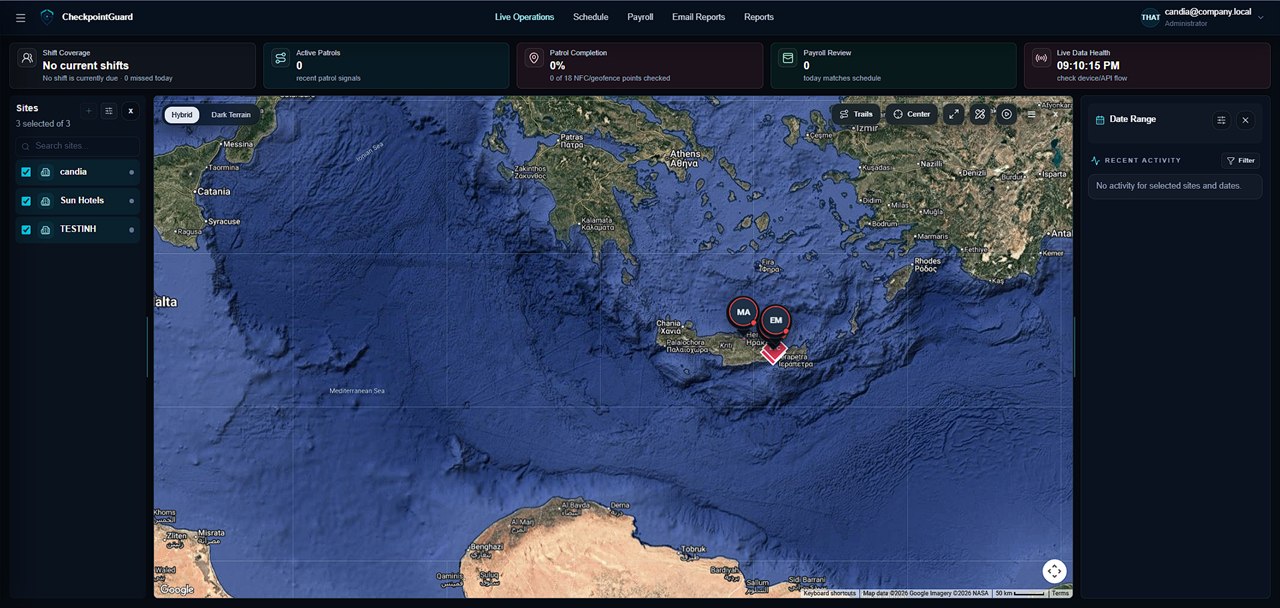
Map the buildings, access roads, parking and other areas covered by the security plan. Give checkpoints recognisable names and choose geofences for appropriate outdoor zones. Avoid treating a whole resort as one check when the operation needs evidence for separate areas.
Use current guard positions and recorded trails to understand how the route is being covered. Check freshness and connectivity before interpreting a gap. NFC or QR visits add named stopping points when geographic coverage alone is insufficient.
Review scheduled coverage when occupancy, events or access requirements change. Use attendance and site costs to examine the staffing behind that coverage, then share the relevant patrol report with resort management for the agreed period.
Illustrative configuration, not a customer deployment: divide the resort patrol plan into accommodation blocks, gates, parking and service zones. Include pools, beach access or other outdoor facilities only where they belong to the property's agreed security duties. Give distant stops names that remain clear in a report, rather than labelling every point simply 'perimeter'.
Use a recorded route to review movement between zones and QR or NFC visits for specific physical stops. An outdoor geofence can add area context where GPS conditions permit, but entry into a zone does not establish that every gate or facility within it was checked. Test the route on the actual patrol phone and account for access restrictions and travel between distant points when planning coverage.
At handover, review which named stops have received evidence and which require follow-up. Compare the route history with checkpoint times, and distinguish an old uploaded position from current coverage. If an event or access restriction changes the planned route, review the affected assignments and remaining coverage with the supervisor. Prepare the resort report around the agreed areas and period, so management can distinguish recorded stops from wider geographic movement and unresolved gaps.
Resorts often cover larger outdoor areas, multiple buildings, parking, entrances, beaches, service roads, and guest spaces. Supervisors need fast visibility across the whole property.
Yes. Live guard map, GPS context, geofences, and NFC checkpoint proof help supervisors review coverage.
Yes. Patrol proof, SOS alerts, geofence events, and activity history can support professional reports.
No. It supports security companies and in-house teams working across many types of client site.
Supported patrol events can be captured offline and uploaded when the device reconnects.